Tuesday, April 4, 2017

Extracting individual Facial Features from Dlib Face Landmarks

If you remember, in my last post on Dlib, I showed how to get the Face Landmark Detection feature of Dlib working with OpenCV. We saw how to use the pre-trained 68 facial landmark model that comes with Dlib with the shape predictor functionality of Dlib, and then to convert the output of into a numpy array to use it in an OpenCV context. We were able to get all 68 feature points on to our face image.

Dlib detecting the 68 Face Landmarks

The 68 feature points which the Dlib model detects include the Jawline of the face, left and right eyes, left and right eyebrows, the nose, and the mouth. So, what if you only want to detect few of those features on a face? E.g. you may only want to detect the positions of the eyes and the nose. Is there a way to extract only few of the features from the Dlib shape predictor?

There is actually a very simple way to do that. Here’s how.

Tuesday, March 28, 2017

Easy Speech Recognition in Python with PyAudio and Pocketsphinx

If you remember, I was getting started with Audio Processing in Python (thinking of implementing an audio classification system) a couple of weeks back (see my earlier post). I got the PyAudio package setup and was having some success with it. As you know, one of the more interesting areas in audio processing in machine learning is Speech Recognition. So, although it wasn't my original intention of the project, I thought of trying out some speech recognition code as well.

I searched around to see what Python packages are available for the task and found the SpeechRecognition package.

Python Speech Recognition running with Sphinx
SpeechRecognition is a library for Speech Recognition (as the name suggests), which can work with many Speech Engines and APIs. The current version supports the following engines and APIs,
  • CMU Sphinx
  • Google Speech Recognition
  • Google Cloud Speech API
  • Wit.ai
  • Microsoft Bing Voice Recognition
  • Houndify API
  • IBM Speech to Text
I decided to start with the Sphinx engine since it was the only one that worked offline. But keep in mind that Sphinx is not as accurate as something like Google Speech Recognition.

First, let's set up the SpeechRecognition package.

Thursday, March 9, 2017

Setting up TensorFlow with CUDA on Windows

I did the post about How to setup TensorFlow on Windows about a month back. I only covered setting up the CPU version of TensorFlow there, and promised that I'll do the guide for the GPU version soon. But I haven't had the change to come round to write the guide until now.

I guess better late than never. So, here's how to setup the GPU version of TensorFlow on Windows.

So, what do you need to get TensorFlow working on GPU?
You need to setup the following prerequisites, in that order.
  1. Microsoft Visual Studio 2015 (The free community edition of VS 2015 will work)
  2. CUDA 8.0
  3. cuDNN 5.1 for CUDA 8.0
Start by installing Visual Studio 2015. You can get the free community edition from here. When you install, make sure to select ‘Custom Installation’, and select ‘Visual C++’ in the programming language selection (by default, C++ is not selected). Once installed, check whether you have C++ capability by checking the ‘New Project’ options.

Visual Studio 2015 installed with C++

Friday, March 3, 2017

How to Graph Model Training History in Keras

When we are training a machine learning model in Keras, we usually keep track of how well the training is going (the accuracy and the loss of the model) using the values printed out in the console. Wouldn't it be great if we can visualize the training progress? Not only would it be easier to see how well the model trained, but it would also allow us to compare models.

Something like this?
Training accuracy and loss for 100 epochs


Well, you can actually do it quite easily, by using the History objects of Keras along with Matplotlib.

Sunday, February 26, 2017

How to solve CNMEM_STATUS_OUT_OF_MEMORY error with Theano on CUDA

Have yo come across the CNMEM_STATUS_OUT_OF_MEMORY error when using Theano with CUDA, with Keras? You might have been trying to train a slightly larger model, and just when the training starts it throws this error and fails.

The CNMEM_STATUS_OUT_OF_MEMORY thrown in Theano with CUDA
The CNMEM_STATUS_OUT_OF_MEMORY thrown in Theano with CUDA

The full error stack looks something like this,

Monday, February 20, 2017

Visualizing Model Structures in Keras

Update 3/May/2017: The steps mentioned in this post need to be slightly changed with the updates in Keras v2.*. Please check the updated guide here: Visualizing Keras Models - Updated.

Have you ever wanted to visualize the structure of a Keras model? When you have a complex model, sometimes it's easy to wrap your head around it if you can see a visual representation of it. What if there's a way to automatically build such a visual representation of a model?

Well, there is a way. Keras has a model visualization function, that can plot out the structure of a model. It would look something like this,
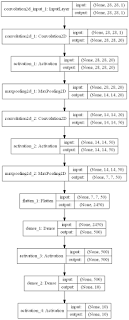
The visualization of the LeNet model

Above is the visualization of the LeNet model, which is defined in code as follows,
 # initialize the model  
 model = Sequential()  
   
 # first set of CONV => RELU => POOL  
 model.add(Convolution2D(20, 5, 5, border_mode="same",  
     input_shape=(height, width, depth)))  
 model.add(Activation("relu"))  
 model.add(MaxPooling2D(pool_size=(2, 2), strides=(2, 2)))  
   
 # second set of CONV => RELU => POOL  
 model.add(Convolution2D(50, 5, 5, border_mode="same"))  
 model.add(Activation("relu"))  
 model.add(MaxPooling2D(pool_size=(2, 2), strides=(2, 2)))  
   
 # set of FC => RELU layers  
 model.add(Flatten())  
 model.add(Dense(500))  
 model.add(Activation("relu"))  
   
 # softmax classifier  
 model.add(Dense(classes))  
 model.add(Activation("softmax"))  

Thursday, February 16, 2017

TensorFlow 1.0 Released!

TensorFlow 1.0 has been released!

Just a week back I posted about the announcement of TensorFlow 1.0 and the new features coming. Now, it's finally here. It was released at the first TensorFlow Dev Summit held yesterday (15th Feb) at Mountain View, California.


The official TensorFlow website is now updated for the 1.0 release, which also now has a section for TensorFlow Fold which allows to work with input data of different shapes and sizes, and which has now been made open-source. The installation instructions have also been updated for the latest version, and they have added a guide on how to upgrade your application to TensorFlow 1.0.

The release notes for 1.0 suggests that all the anticipated features are here: The XLA compiler, Debugger, The Java API, Mobile support improvements, and much more. There's also news reports coming in which states that more machine learning models, such as SVMs, will come to TensorFlow. Better support for Keras is also hinted. I'm eagerly waiting for Keras to upgrade to support new features in TensorFlow 1.0.

Related posts:

Related links:

Build Deeper: Deep Learning Beginners' Guide is the ultimate guide for anyone taking their first step into Deep Learning.

Get your copy now!